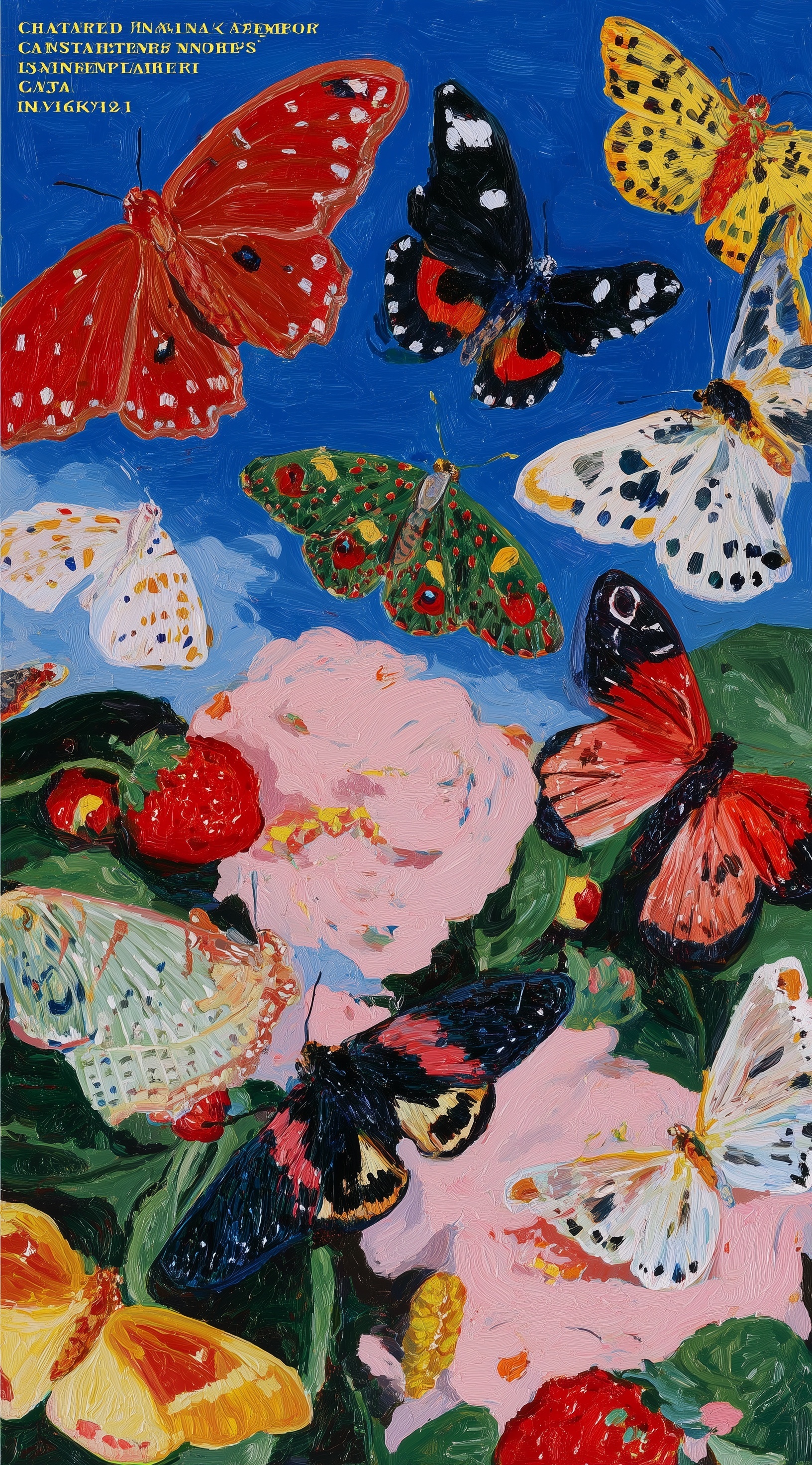
Thick impasto oil painting of multiple butterflies with crimson, golden yellow, black-and-white, and emerald green wing patterns, heavy dimensional palette knife ridges, dense textured brushstrokes catching warm midday light from upper left, electric cobalt sky background with subtle atmospheric depth, lush pink peonies and ripe strawberries in lower composition, overlapping butterfly placement at varied depths, Expressionist energy with controlled chaos, high saturation complementary color vibration, vertical 9:16 format --ar 9:16 --style raw --s 750
Quick Tip: Click the prompt box above to select it, then press Ctrl+C (Cmd+C on Mac) to copy. Paste directly into Midjourney, DALL-E, or Stable Diffusion and customize to make it your own!
A naive attempt at impasto butterfly art usually produces a flat, digital illustration with a faint noise overlay. The informed approach, by contrast, yields visible palette-knife ridges, paint peaks catching the light, and a tactile surface that reads as oil on canvas. The difference is not the subject matter; it is how the prompt describes the physical behavior of the medium. When the model receives only "oil painting," it defaults to a smooth, blended finish. When it receives "heavy impasto" combined with "palette knife," the rendering engine shifts to a relief-texture mode, producing dimensional strokes that cast micro-shadows.
This gap between a flat result and a sculpted one comes down to three specific levers: the texture noun, the lighting direction, and the saturation constraint. The following sections compare those approaches side by side, using the same butterfly composition, so the trade-offs are visible rather than theoretical.
Approach 1: Keyword Stacking vs. Physical Tool Naming
The first common approach is stacking adjectives: "thick, textured, heavy, chunky, impasto, oil painting." This fails because most of those words are treated as style synonyms rather than physical instructions. The model averages them into a generic painterly filter. The visible signature is a canvas that looks like a photograph with a mild oil-paint filter; edges are soft, and there is no directional ridge.
The second approach names the tool that creates the texture. "Palette knife" and "brushstroke ridges" are concrete nouns. The model associates a palette knife with broad, flat, angled strokes that leave sharp edges and raised paint. This forces a different geometry: the strokes become wider, the edges more abrupt, and the highlights sit on the ridge tops. The trade-off is that this approach can make small details, like butterfly antennae, look too chunky if the tool noun dominates the prompt.
The fix is to balance the tool noun with a subject anchor. Keep the tool phrase early but immediately follow it with the specific wing patterns. In practice, "palette knife ridges, crimson and emerald wing patterns" produces a more controlled result than either phrase alone. This mirrors the logic behind other texture-heavy prompts, such as the Van Gogh impasto night scene, where the tool name anchors the render mode before the scene description takes over.
If the model still smooths the ridges, the issue is usually the aspect ratio. A square format compresses the vertical strokes. A 9:16 vertical format gives the palette knife room to travel, which is why the original prompt specifies vertical. The trade-off is that vertical also crops the foreground flowers, so the peony and strawberry anchor must be placed in the lower third explicitly rather than left to chance.
Approach 2: Flat Saturation vs. Complementary Vibration
The second comparison is about color. A naive prompt asks for "vibrant colors" or "high saturation." The model then pushes every hue toward maximum chroma, which flattens the depth and makes the butterflies merge into the background. The visible result is a poster-like image with no atmospheric separation. The informed approach uses "complementary color vibration" instead. This term tells the model to place opposing hues side by side at similar value, which creates optical tension rather than uniform brightness.
In this composition, the cobalt sky is the cool anchor. The crimson and golden yellow butterflies sit against it as warm complements. The emerald green wings act as a secondary complement to the red strawberries. When the prompt specifies "high saturation complementary color vibration," the model keeps the sky deep and the butterflies bright, so the edges between them remain readable. Without that phrase, the sky often turns light blue and the butterflies lose their silhouette.
The trade-off is that complementary vibration can make the image look busy if the lighting is flat. That is why the prompt pairs it with "warm midday light from upper left." Directional light creates a value difference between the lit ridge and the shadowed valley, which prevents the complementary colors from canceling each other out. The same principle appears in vibrant abstract art deco portraits, where complementary pairs are held together by a single strong light source rather than by desaturation.
If the colors still muddy, reduce the number of hues. Four wing patterns, as in this prompt, is already the upper limit. Adding a fifth color, such as purple or orange, forces the model to average the palette, and the vibration collapses into a brownish mid-tone. The informed choice is to keep the palette at four and let the lighting create the variation instead.
Approach 3: Static Composition vs. Overlap Depth Stacking
The third comparison is spatial. A naive prompt lists elements: "butterflies, peonies, strawberries, blue sky." The model arranges them in a loose grid, often with equal spacing. The result reads as a pattern, not a painting. The informed approach specifies "overlapping butterfly placement at varied depths." This phrase instructs the model to layer the wings so that some cross in front of others, which creates a sense of air and distance even in a flat medium.
The visible signature of overlap depth is that the foreground butterflies have sharper ridge shadows, while the background ones are slightly softer and cooler. The model simulates aerial perspective by reducing contrast on the far elements. The trade-off is that heavy overlap can hide the wing patterns, so the prompt must also specify "varied depths" rather than "dense overlap." Varied depths keeps at least two butterflies fully visible at each layer.
This is where the foreground anchor matters. The pink peonies and strawberries at the bottom are not decoration; they are a depth cue. Because they are large and close, they tell the model where the camera sits. Without them, the butterflies float in an ambiguous space. With them, the composition gains a clear near-to-far axis. A similar layering logic drives hyper-realistic floating food compositions, where a single foreground object anchors the depth of the entire scene.
The trade-off with a strong foreground anchor is that it can dominate the frame. In a 9:16 vertical, the lower third is valuable real estate. If the peony is too large, it competes with the butterflies. The fix is to describe it as "lush pink peonies" rather than "giant peony," which keeps the scale suggestive rather than fixed. The model then sizes it to fit the anchor role without swallowing the composition.
All three approaches share a dependency on the model version. Newer versions of Midjourney interpret tool nouns more literally than older ones, so a prompt that produced smooth paint in v5 may produce aggressive ridges in v6. The practical move is to keep the tool noun and the lighting direction in the first half of the prompt, where attention weight is highest, and let the color and depth phrases follow. That ordering is what separates the flat illustration from the sculpted canvas.
The next variation to try is to swap the background from cobalt sky to a warm terracotta wall while keeping the same palette knife and lighting phrases. Expect the complementary vibration to shift from cool-warm to warm-warm, which will make the emerald wings read as the primary accent instead of the crimson ones. If the result feels too heavy, reduce the saturation phrase to "balanced saturation" and keep the ridge description intact. That single change will tell you whether the texture or the color is carrying the image.
Label: Cinematic
Key Principle: Keywords like "thick paint" are ignored; you must specify the tool. Use "palette knife ridges" and "heavy impasto" to force the model into a physical texture rendering mode.
Comments
Post a Comment