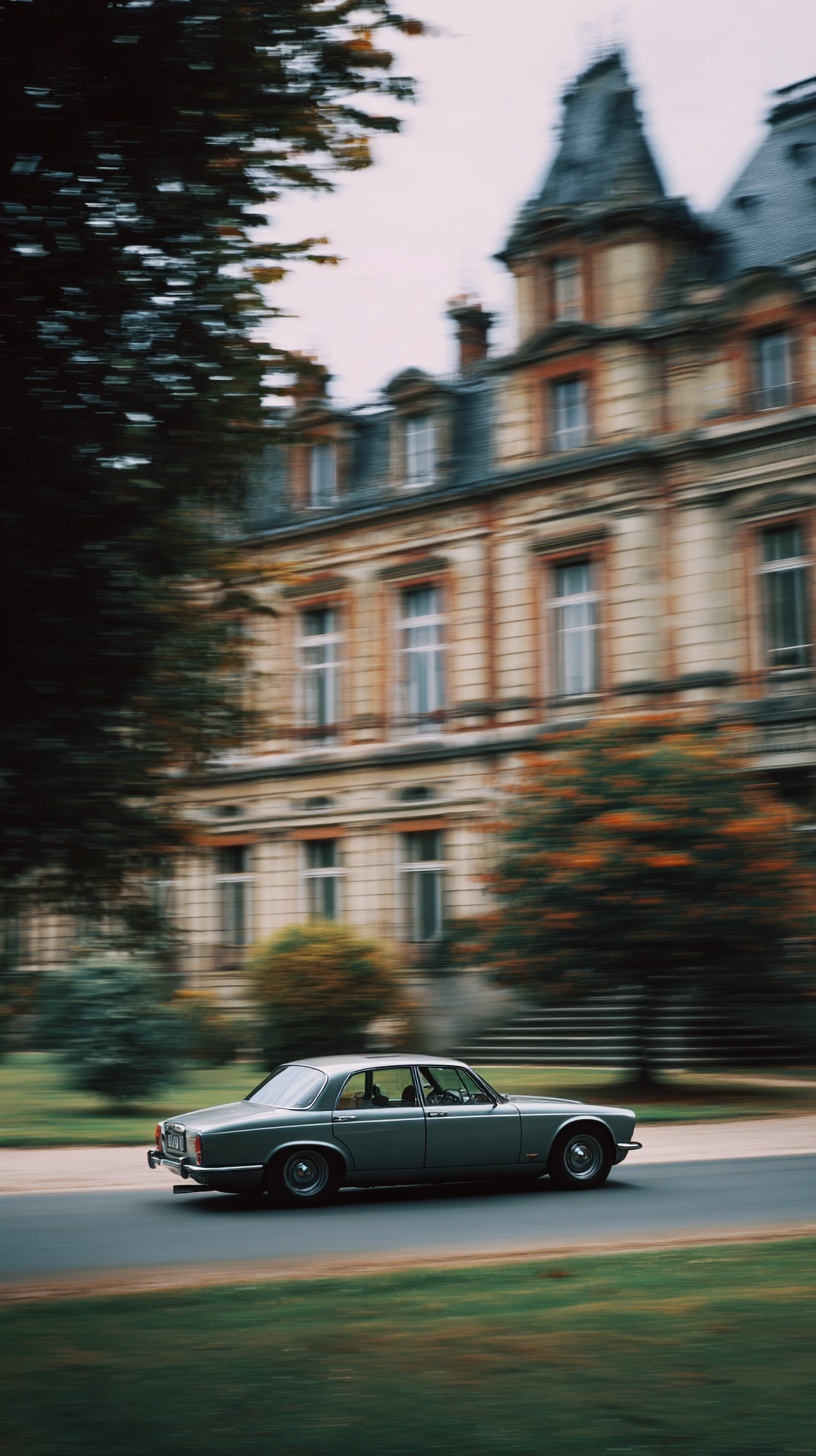
Cinematic panning shot, silver-grey 1973 Jaguar XJ12 Series 2 in flawless condition, vehicle body tack-sharp with readable chrome details and defined panel lines, strong horizontal motion blur streaking left-to-right across background only, French Renaissance chateau with slate roofs and limestone facades rendered as elongated horizontal smears, autumn foliage as directional amber and russet streaks maintaining horizontal trajectory, foreground grass bleeding into muted olive horizontal bands, overcast October afternoon at 4pm with soft diffused skylight from 45 degrees upper left, desaturated Kodak Vision3 250D film emulation with cyan shadow push and warm highlight rolloff, subtle halation bleeding from chrome edges, 85mm lens compression flattening depth planes, rule of thirds with generous leading space ahead of vehicle, medium shot framing from waist height, aristocratic melancholy mood, 8K scan texture with organic 35mm grain structure --ar 9:16 --style raw --s 250 --chaos 8
Quick Tip: Click the prompt box above to select it, then press Ctrl+C (Cmd+C on Mac) to copy. Paste directly into Midjourney, DALL-E, or Stable Diffusion and customize to make it your own!
Two prompts, same car, same chateau, wildly different results. The naive version asks for "a vintage car driving fast with motion blur" and returns a soft, smeared sedan where the grille, the chrome, and the badge dissolve into the background streaks. The informed version isolates the vehicle as the only sharp element and confines the blur to a single directional axis behind it. The gap between those two outputs is not luck. It is the difference between treating motion blur as a mood word and treating it as a spatial instruction.
Most generators treat "motion blur" as a global filter, not a selective effect. When the phrase appears unqualified, the model applies blur across the whole frame, including the subject, because it has no reason to assume the car should be exempt. The fix is grammatical: define the vehicle as tack-sharp first, then define the background as the only carrier of the streak. That ordering matters because Midjourney and similar engines weight early tokens more heavily when resolving competing instructions.
The Subject Lock: Why "Tack-Sharp" Beats "In Focus"
The phrase "tack-sharp" does more work than "in focus" because it implies edge definition, micro-contrast, and readable surface detail, not just the absence of blur. When the prompt says "vehicle body tack-sharp with readable chrome details and defined panel lines," it forces the model to reserve high-frequency detail for the car. Panel gaps, the door shut line, the thin chrome strip along the window sill, the rubber seal around the windscreen: these are the anchors that tell the viewer the car is stationary relative to the camera, which is exactly the physics of a real panning shot.
If you drop the panel-line clause, the model usually keeps the silhouette sharp but softens the interior surfaces. The car looks like a cutout pasted onto a blurred plate. Adding "readable chrome" specifically prevents that, because chrome highlights are high-contrast specular events that the model will not sacrifice without pushback. For portraits where similar edge-control logic applies, the feathered portrait breakdown shows how selectively sharp features anchor an otherwise soft frame.
One trade-off worth naming: over-repeating "sharp" across the prompt causes the model to sharpen the background too, which kills the blur. The word should appear once, attached to the vehicle, never as a standalone global modifier.
Directional Blur: The Left-to-Right Streak Is Not Optional
Blur without a stated axis is the second most common failure. The model defaults to radial or motion-vector blur that radiates from the center, which reads as ghosting rather than speed. Stating "strong horizontal motion blur streaking left-to-right across background only" pins the vector. Left-to-right specifically matters because the car is facing left in the composition, so the streak direction implies forward travel, not reverse.
The phrase "across background only" is the surgical clause. It tells the model that the blur is a depth-layer effect, not a frame-wide one. Without it, the chateau, the trees, and the car all receive the same treatment and the image becomes mush. With it, the model builds a foreground-to-background separation where the road surface stays semi-defined, the mid-ground foliage smears, and the far facade elongates into horizontal strokes.
Note that the autumn foliage needs its own directional instruction: "directional amber and russet streaks maintaining horizontal trajectory." Trees are textured, and texture blurs unpredictably if left unguided. Naming the trajectory keeps the leaf clusters from turning into diagonal noise that contradicts the panning axis.
Palette, Film Stock, and the Halation Detail
The Kodak Vision3 250D emulation does two things at once: it desaturates the midtones and it introduces a cyan shadow push. That combination is what separates a cinematic panning shot from a stock-photo pan. Without the film reference, the model tends to render saturated greens and oranges that fight the aristocratic melancholy the prompt is chasing. The 250D reference is daylight-balanced, which matches the stated "overcast October afternoon at 4pm" lighting and keeps the highlight rolloff warm without going gold.
Halation is the underused clause. "Subtle halation bleeding from chrome edges" instructs the model to bleed a faint red-orange glow around specular highlights, mimicking how film responds to bright reflective surfaces. On the Jaguar, this shows up on the bumper overriders, the headlight bezels, and the window trim. It is a small effect, but it is the difference between a digital render and a scanned frame. Similar light-behavior logic appears in the impasto night scene prompt, where highlight bleed defines the material.
The trade-off: halation at high strength turns chrome into orange smear. Keep it "subtle" and expect the visible result to depend heavily on the model version. Newer engines often exaggerate halation; older ones barely register it.
Lens, Framing, and What Still Depends on the Model
The 85mm compression clause is doing structural work. A wider lens would exaggerate the background blur but also distort the car's proportions, making the long XJ12 bonnet look stretched. At 85mm, the depth planes flatten, the chateau sits closer to the car visually, and the horizontal streaks stay parallel instead of fanning outward. The "waist height" framing keeps the horizon low and gives the vehicle a dominant horizontal mass in the lower third.
Rule of thirds with "generous leading space ahead of vehicle" places the car on the left third, pointing into negative space. This is the composition that makes a panning shot feel like it is going somewhere rather than just sliding across the frame. The leading space is where the viewer's eye travels, and it is also where the blur streaks are longest and cleanest.
What remains model-dependent: the exact streak length, the strength of the halation, and whether the chateau's slate roof reads as elongated smear or as a soft mush. Higher --chaos values produce more variation in streak direction, which can be useful for exploration but disruptive for consistency. Lower --s values reduce stylistic push but also reduce the film emulation fidelity. The only reliable control is iteration on the same seed.
If you are generating on Adobe Firefly or a similar platform, expect the directional blur clause to behave differently. Firefly tends to honor composition instructions more literally and film-stock references less literally, so the halation and grain may need to be added in post.
One more judgment call: the "aristocratic melancholy" mood phrase is doing less than it looks. It affects color grading and contrast slightly, but it does not override the technical clauses. If the film emulation and lighting are correct, the mood arrives on its own. If they are wrong, no mood word will rescue the frame.
Verify before accepting the render:
1. Zoom to the grille and confirm the vertical slats are individually readable, not merged.
2. Check that the blur streaks are horizontal across the entire background, with no diagonal drift in the trees.
3. Confirm the road surface is semi-sharp, not fully smeared, so the car has ground contact.
4. Look at the chrome trim for halation glow: present but not blooming into orange.
5. Verify the car sits on the left third with clear empty space ahead of the bonnet.
6. Check the sky for banding; desaturated film emulations often posterize flat overcast gradients.
Label: Cinematic
Key Principle: Motion blur only reads as speed when the subject stays sharp and the blur direction stays consistent. Lock the car first, then describe the streak trajectory in explicit directional terms.
Comments
Post a Comment