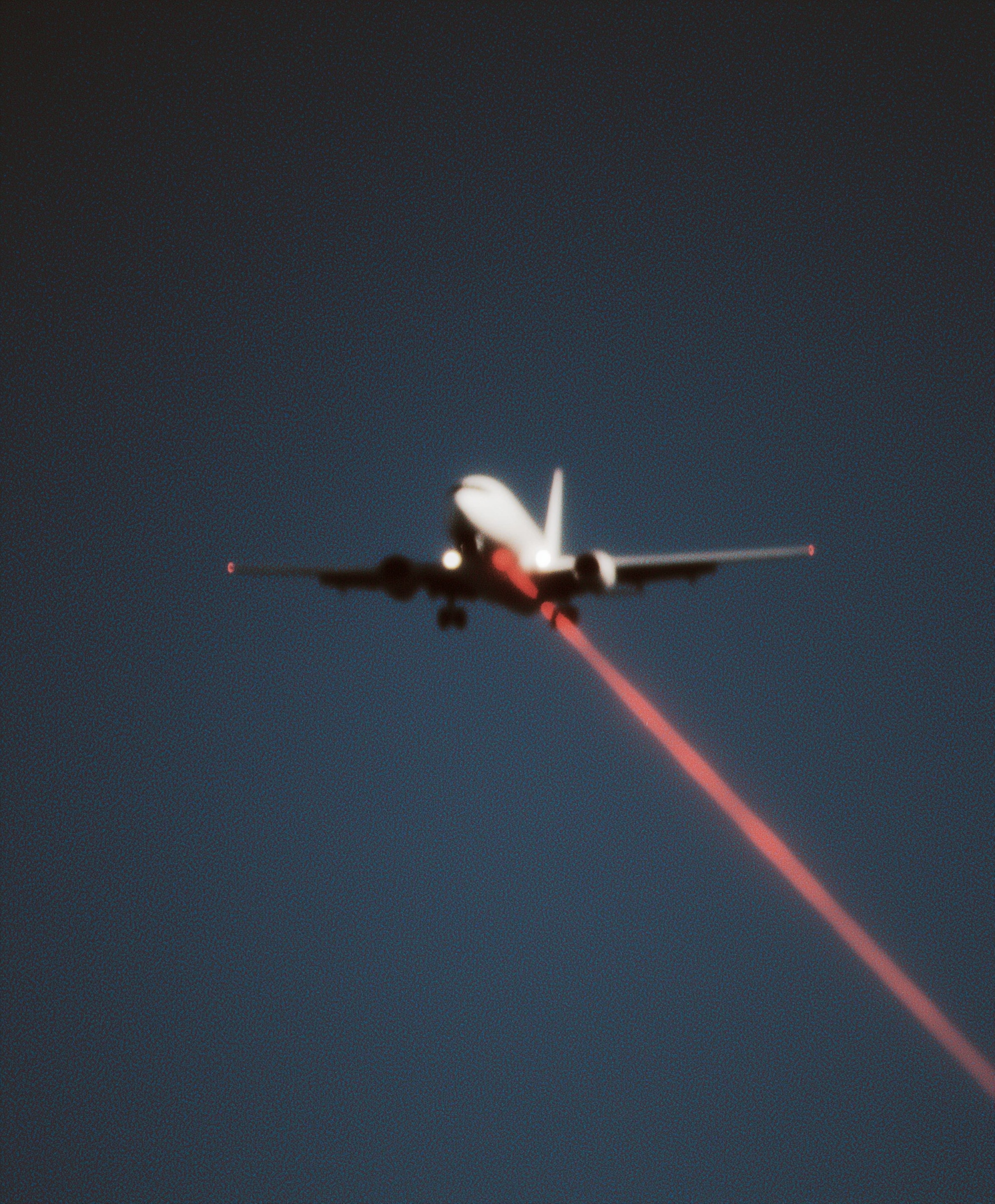
Commercial airliner viewed from below against twilight sky, white fuselage with crimson tail markings, piercing landing lights cutting through atmospheric haze. Violent scarlet laser beam projecting diagonally from undercarriage into void below. Heavy 35mm film grain structure, expired Kodachrome 64 aesthetic with push-processed shadows bleeding into indigo sky. Wingtip motion blur suggesting extreme velocity. Shallow depth of field isolating aircraft from crushing darkness. Centered composition with 12-degree Dutch angle. Chromatic aberration fringing on laser edge. 1980s surveillance photography mood, silver halide texture, deep navy blacks, arterial red highlights. --ar 1:1 --style raw --s 50
Quick Tip: Click the prompt box above to select it, then press Ctrl+C (Cmd+C on Mac) to copy. Paste directly into Midjourney, DALL-E, or Stable Diffusion and customize to make it your own!
The core principle of cinematic thriller prompting is that specific film emulation and mechanical lighting behavior must be explicitly defined to prevent the AI from defaulting to a generic digital aesthetic. The model interprets "grainy" and "sci-fi" as vague stylistic suggestions unless they are anchored to physical parameters like stock type, exposure latitude, and light diffraction.
To understand why the resulting image feels like a still from a 1980s surveillance tape, you must look at how the AI processes the interplay between the subject and the void. The prompt does not simply ask for a plane; it asks for a specific relationship between a white fuselage and a crushing, indigo-black sky. This relationship is defined by the "push-processed shadows" mentioned in the prompt, which forces the model to render the background not as a flat color, but as a grainy, chemical texture that bleeds into the aircraft's silhouette.
This foundational layer is what separates a standard sci-fi illustration from a piece of thriller art. Without the film grain structure, the laser and the plane would look like a clean vector graphic or a video game render. By specifying "expired Kodachrome 64," you are instructing the model to introduce color shifts—specifically the muted cyans and deep navy blacks—and a physical silver halide texture that gives the image weight. The model uses this to determine how much noise to apply to the shadows and how much contrast to maintain in the highlights.
Before moving to the next layer of complexity, check your base image for the "crushing darkness." If the sky is a flat, bright blue or if the plane's white fuselage looks too clean and plastic, your prompt lacks the necessary film stock anchors. You need the shadows to feel heavy and the highlights to feel slightly blown out, mimicking a high-contrast push process.
How the Model Interprets the Laser and Motion Blur
The second layer involves the specific physics of the laser beam and the suggestion of velocity. The prompt describes a "violent scarlet laser beam projecting diagonally from undercarriage into void below." The AI must interpret this not as a solid line, but as a light source that interacts with the atmosphere. This is where "chromatic aberration fringing on laser edge" becomes critical. The model uses this instruction to create a slight color separation on the edges of the beam—a red fringe on one side and a cyan fringe on the other—which is a common optical artifact in vintage lenses when photographing high-contrast light sources.
Motion blur is the other key element here. The prompt specifies "wingtip motion blur suggesting extreme velocity." When the AI sees "motion blur," it often applies it globally, making the entire image look soft. To prevent this, the prompt uses "shallow depth of field isolating aircraft from crushing darkness." This tells the model to keep the central fuselage sharp while only blurring the extremities. The result is a frozen moment of high speed, where the plane is in focus but the wings are already moving out of the frame. This creates a sense of urgency and panic, essential for the thriller genre. For more on controlling dynamic movement and focal points in AI art, you can explore techniques for mastering street portraits, where similar rules of focus and motion apply.
The laser itself must be treated as a physical object. If the prompt simply says "laser," the model might render a straight, thin line. By adding "projecting diagonally from undercarriage into void below," you force the model to calculate the angle and the origin point. The "arterial red highlights" ensure that the laser's color is not just bright, but saturated and slightly dark, resembling blood or a warning signal. This color choice is what drives the emotional impact of the image.
Before proceeding, verify that the laser is not just a painted line on the image. It should have a slight glow and a visible edge where the chromatic aberration is applied. If the laser looks too perfect or too thin, you have not successfully instructed the model to treat it as a physical light source.
Advanced Composition and the Dutch Angle
The third layer is compositional tension. The prompt specifies "centered composition with 12-degree Dutch angle." A Dutch angle is a camera technique where the horizon is deliberately tilted. The AI understands this as a rotation of the entire scene. A 12-degree tilt is subtle enough to feel disorienting without looking like a mistake. This is the element that transforms the image from a simple plane shot into a thriller poster. The tilt implies that the world is off-balance, that something is wrong.
Centering the aircraft while tilting the horizon creates a conflict between stability and instability. The plane is the anchor, but the world around it is skewed. This is a classic visual trope in psychological thrillers. The AI will apply this tilt to the sky and the laser beam, meaning the laser will cut diagonally across the frame, further enhancing the dynamic tension. If you are interested in how different angles and lighting setups affect the narrative of a scene, the principles discussed in burning ace of spades prompt cinematic provide a useful parallel for structuring high-stakes imagery.
The "1980s surveillance photography mood" is the final piece of the puzzle. This is not just about grain; it is about the feeling of a low-budget, high-stakes observation. The AI associates this mood with slightly desaturated colors, heavy vignetting, and a sense of voyeurism. The plane is being watched from below, perhaps by someone on the ground. This perspective is crucial. The prompt "viewed from below" is not just a camera angle; it is a narrative device. It places the viewer in a position of vulnerability, looking up at a threatening object.
To test this layer, look at the corners of your image. Are they darker than the center? Is the sky a deep, almost black indigo? If the image looks like a bright daytime shot, the "surveillance mood" has not been applied. You may need to increase the weight on terms like "push-processed shadows" or "deep navy blacks" to force the model to darken the overall exposure.
Edge Cases and Parameter Tuning
When working with this specific prompt structure, edge cases often arise around the "expired Kodachrome" instruction. The AI might interpret "expired" as a request for heavy color degradation, leading to a muddy or brownish image. To counter this, the prompt includes "arterial red highlights" and "white fuselage." These high-contrast elements force the model to retain some vibrancy. If your output looks too muddy, you can increase the stylize parameter to 100 or add "vibrant" to the color descriptions, though this risks losing the vintage feel.
Another edge case is the "shallow depth of field." In a square aspect ratio (--ar 1:1), a shallow depth of field can sometimes make the plane look like a miniature toy. To avoid this, the prompt specifies "viewed from below." This perspective implies a large scale, as the plane fills the frame from a low angle. If the plane looks small, you need to adjust the camera angle wording or increase the subject's size in the frame.
The "chromatic aberration" is the most delicate instruction. If the model over-applies it, the entire image will look like a 3D glasses test. If it under-applies it, the laser will look flat. The key is to tie the aberration to the laser edge specifically. The prompt does this by saying "chromatic aberration fringing on laser edge." This limits the effect to the high-contrast area. If you see aberration on the plane's wings or the sky, the model has misinterpreted the scope. You can fix this by adding "only on laser edge" or reducing the overall contrast slightly.
Finally, the "35mm film grain structure" must be visible but not overwhelming. In Midjourney, this is often achieved through the "style raw" parameter, which reduces the model's default aesthetic smoothing. The grain should look like a physical texture, similar to the noise in a high-ISO film scan. If the image looks too smooth, you have not successfully triggered the film grain instruction.
Before finalizing your image, review the balance between the laser and the plane. The laser should be the brightest element, but the plane must remain the focal point. Use the "shallow depth of field" to your advantage by ensuring the plane's cockpit and fuselage are the sharpest parts of the image, while the laser fades slightly into the void. This creates a hierarchy of attention that guides the viewer's eye from the source of the threat to the threat itself. You can explore similar lighting hierarchies in other cinematic prompts, such as those used for midjourney horror prompt mastering, to see how light and shadow dictate the viewer's emotional response.
The final principle is that every element in the prompt must serve the narrative of tension. The grain is not just texture; it is the grit of a surveillance photo. The laser is not just a light; it is a weapon. The Dutch angle is not just a tilt; it is a sign of a broken world. When you construct your prompt, you are not just describing a scene; you are directing a moment of fear and awe. The AI will follow your lead, provided you give it the specific technical parameters to do so.
Label: Cinematic
Key Principle: To achieve a cinematic thriller aesthetic, anchor the scene in a specific film stock like expired Kodachrome 64 and use a Dutch angle to create tension. The laser must be framed as a physical light source interacting with atmospheric haze to maintain realism.
Comments
Post a Comment