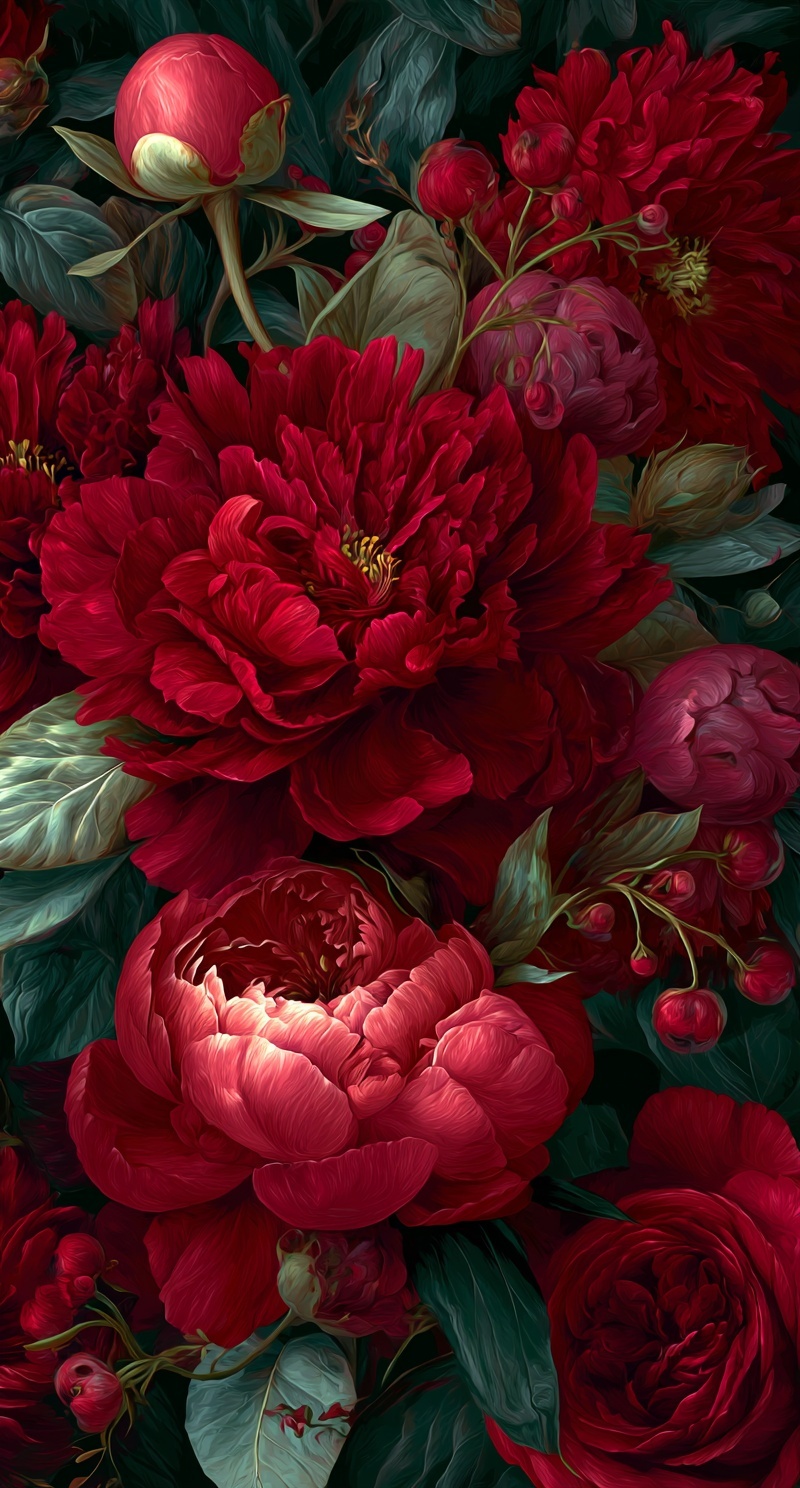
Vertical cascade of velvety crimson peonies and blood-red roses at multiple bloom stages, tight spherical buds, half-opened ruffles, and fully exploded blooms with visible stamens, interlaced with wine-red berries on arching stems. Lush forest-green foliage with silvery sage undersides, leaves catching warm key light and swallowed by cool shadow. Classical oil painting technique with visible directional brushwork following petal curvature, impasto texture on highlight crests only. Single dramatic chiaroscuro light source from upper left at 45 degrees, luminous edge separation, near-black recesses with amber undertones. Palette: arterial red, rose madder, sap green, viridian, teal-black. Dense 9:16 composition with blooms pressing frame edges, shallow focal plane on central peony, atmospheric depth via desaturation in rear planes. Museum quality, Sargent brush economy meets contemporary digital precision --ar 9:16 --style raw --v 6
Quick Tip: Click the prompt box above to select it, then press Ctrl+C (Cmd+C on Mac) to copy. Paste directly into Midjourney, DALL-E, or Stable Diffusion and customize to make it your own!
The core principle of lush floral branding is that color saturation alone does not create luxury; controlled light decay does. A prompt that requests "vibrant red flowers" will return a flat, evenly lit arrangement that reads as stock photography. The same subject rendered with a specified light source, shadow depth, and bloom-stage differentiation produces the visual weight that premium branding requires. The mechanism is straightforward: the model needs explicit instructions about where light originates, how it falls off, and which elements remain in shadow.
This distinction matters because floral branding assets are rarely decorative. They function as backgrounds for product packaging, editorial headers, and seasonal campaign visuals. When the output lacks directional light, the image cannot integrate with typography or product photography because it has no consistent light logic. A floral field lit from every direction creates no anchor point for a headline, no natural shadow pocket for a logo, and no visual hierarchy that guides the eye.
What "Lush" Actually Means in a Prompt
Lushness in floral rendering is not a density problem. Adding more blooms to the prompt does not increase perceived richness; it increases visual noise. The parameter that controls lushness is bloom-stage variation. A prompt that specifies "tight spherical buds, half-opened ruffles, fully exploded blooms with visible stamens" gives the model three distinct geometric structures to render. Each structure reflects light differently, creating micro-contrast across the composition.
When all flowers are at the same stage, the model averages their shapes into a repetitive pattern. The eye registers this as wallpaper, not as a living arrangement. Stage variation forces the renderer to allocate different surface treatments: buds get smooth, reflective petal surfaces; half-opened blooms show layered translucency; fully opened blooms expose stamens and deep recesses. This variation is what separates a branded asset from a generic flower field.
The foliage specification works the same way. "Lush forest-green foliage with silvery sage undersides" is not decorative language. It tells the model that leaves have two distinct surface colors depending on angle. This produces the same light-response logic seen in impasto night scene prompts, where surface orientation determines whether a plane reads as illuminated or shadowed. Without this dual-surface instruction, leaves render as flat green shapes that compete with the blooms instead of supporting them.
How the Model Interprets Chiaroscuro Parameters
Chiaroscuro in AI generation is controlled by two parameters: light angle and shadow density. The prompt specifies "single dramatic chiaroscuro light source from upper left at 45 degrees." This is not a stylistic preference; it is a spatial instruction. The model uses this angle to calculate edge separation on every rounded surface. Petals facing upper-left receive highlight; petals facing lower-right fall into shadow.
The shadow density parameter is equally important. "Plunging recesses into near-black with amber undertones" tells the model that shadow is not neutral gray but a warm, saturated dark. This prevents the common failure mode where shadows render as flat black voids. Amber undertones in shadow create the illusion that light is bouncing from a warm surface, which is how oil paintings handle deep shadow without losing color information.
When chiaroscuro parameters are vague, the model defaults to ambient occlusion: soft, even shadows that flatten the image. The visible symptom is a floral arrangement that looks illustrated rather than painted. The cause is that the model had no directional instruction, so it applied uniform shading. The controlling parameter is the explicit angle and the color of the shadow itself.
This same light-logic approach appears in dramatic feathered portrait prompts, where the direction of light determines whether facial features read as sculpted or flat. In both cases, the model needs to know where light comes from before it can calculate how surfaces respond.
Paint Media as a Branding Texture Layer
Specifying "classical oil painting technique" does more than set a style. It activates a texture model that changes how the renderer handles brushwork, edge hardness, and surface variation. The phrase "visible directional brushwork following petal curvature" instructs the model that strokes are not random but follow the geometry of the subject. This produces the characteristic oil-paint effect where form is built through stroke direction rather than outline.
The impasto instruction is a precision tool. "Impasto texture reserved for highlight crests only" prevents the model from applying thick paint across the entire surface. When impasto is unrestricted, the image becomes uniformly textured, which reads as noise at small sizes. Restricting impasto to highlight crests creates a tactile quality that appears only where light strikes, mimicking how physical paint catches illumination on raised edges.
Digital precision and Sargent brush economy are not contradictory instructions. The prompt asks for a rendering that has the control of digital workflow but the stroke efficiency of a master painter. Sargent's economy means each brushstroke carries maximum information: a single stroke defines form, color, and light simultaneously. When the model interprets this, it reduces redundant strokes and increases the information density of each visible mark.
The palette specification works as a constraint system. "Arterial red, dried blood, rose madder, sap green, viridian, teal-black" gives the model six anchor colors. Each color carries a different value and temperature. Arterial red is bright and warm; dried blood is dark and slightly desaturated; rose madder is cool and transparent. By naming specific pigments rather than generic colors, the prompt prevents the model from defaulting to pure RGB red, which reads as synthetic.
Edge Cases: When the Prompt Breaks
The most common failure occurs when bloom count exceeds the model's ability to differentiate. If the prompt requests more than twelve distinct blooms in a vertical 9:16 frame, the renderer begins merging petal structures. The symptom is a composition where individual flowers become indistinguishable. The controlling parameter is the ratio of blooms to frame area; beyond a certain density, the model stops rendering individual geometry and starts rendering texture patterns.
Another edge case involves the interaction between shallow focal plane and deep shadow. When the prompt specifies "shallow focal plane on central peony" and "atmospheric depth via desaturation and cooling in rear planes," the model must simultaneously blur and darken background elements. If shadow density is too high, the background becomes pure black and the depth cue is lost. The fix is to reduce shadow density in rear planes by specifying "cool desaturated midtones" rather than "near-black" for background elements.
The final edge case is the interaction between berries and blooms. Wine-red berries on arching stems are small, high-contrast elements. If the prompt does not specify their scale relative to blooms, the model may render them at the same size as buds, creating visual confusion. Specifying "berries at one-third bloom scale" gives the model a proportional anchor.
For readers working with different generation platforms, the same principles apply. Whether using Midjourney or Adobe Firefly, the model needs explicit light direction, shadow color, and bloom-stage differentiation to produce branding-grade floral assets. The platform changes the interface, not the underlying mechanism.
The next variation to try is a horizontal 16:9 crop of the same prompt with the light source moved to upper right. Expect the central peony to shift its highlight edge, creating a mirrored composition suitable for left-aligned typography. The shadow pockets will move to the left side of each bloom, opening space for product placement or text overlay on the right third of the frame.
Label: Branding
Key Principle: Lush floral branding succeeds when the prompt specifies bloom stages and directional light angles. Vague terms like "beautiful flowers" produce flat, generic outputs.
Comments
Post a Comment