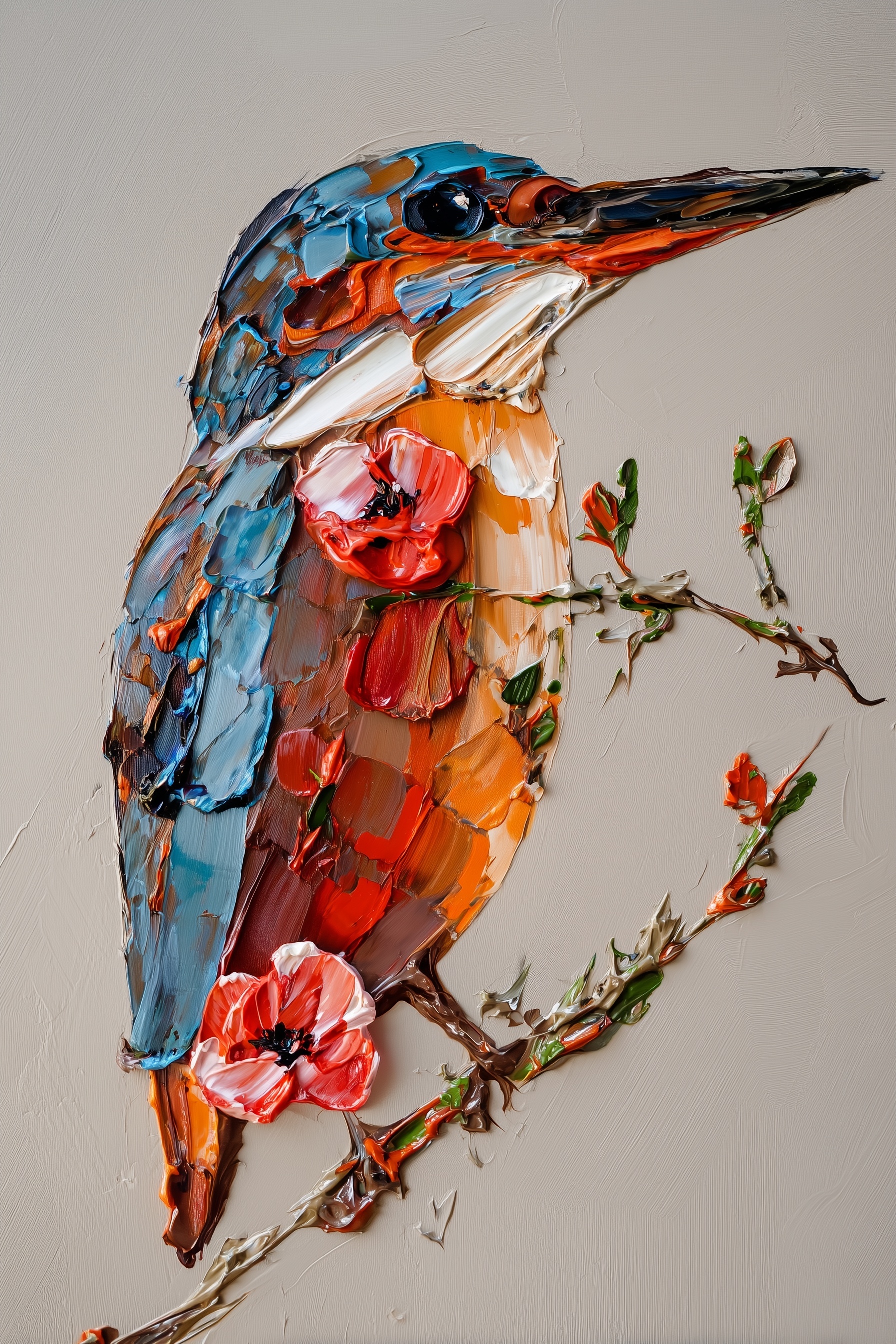
Heavy impasto oil painting, kingfisher bird in three-quarter profile facing right, sculptural palette knife ridges 3-4mm thick, perched on weathered branch with crimson poppy blooms. Electric cobalt blue dorsal plumage with visible individual stroke texture, burnt sienna-orange breast with underpainting shadows, crisp white throat patch catching light, long tapered beak in carbon black to raw umber gradient. Aggressive impasto: paint applied in loaded brushstrokes with dimensional peaks catching specular highlights, valleys revealing underlayers. Soft raking light from upper left, 45-degree angle, creating micro-shadows in texture crevices. Limited saturated palette: ultramarine blue, vermillion, cadmium orange deep, titanium white, raw umber, ivory black. Warm greige background with subtle linen canvas weave, sufficient chromatic distance from subject. Portrait composition: bird positioned at left third intersection, beak extending toward right edge creating diagonal tension, vertical 2:3 aspect ratio. Gallery-ready, archival quality, museum lighting presentation. --ar 2:3 --style raw --s 750
Quick Tip: Click the prompt box above to select it, then press Ctrl+C (Cmd+C on Mac) to copy. Paste directly into Midjourney, DALL-E, or Stable Diffusion and customize to make it your own!
The instinct when generating textured artwork is to push the stylization slider to its maximum. The assumption is that higher values equate to more aggressive brushwork, thicker paint, and a more convincing physical presence. In practice, this approach usually produces the opposite: a flat, digital-looking surface where the "paint" resembles a plastic filter rather than a three-dimensional medium. The model interprets extreme stylization as a demand for abstraction, not physical depth. To achieve the sculptural quality of a heavy impasto kingfisher, the prompt must prioritize the physics of light and the geometry of the paint over the intensity of the style.
This mechanism becomes clear when analyzing how image synthesis models handle surface texture. A model like Midjourney does not "feel" the paint; it predicts pixel arrangements based on training data. When you request "thick paint," the model retrieves images of thick paint. If the lighting is flat, the result is a flat image of thick paint. To create the illusion of 3-4mm ridges catching specular highlights, the prompt must explicitly define the light source and the angle of incidence. Without a defined raking light—such as "soft raking light from upper left, 45-degree angle"—the AI has no reason to calculate the micro-shadows that reveal the depth of the palette knife strokes. The texture only exists visually if the light interacts with it.
The Geometry of the Stroke and Color Separation
The specific challenge with the kingfisher subject is the intersection of high-contrast color zones and heavy texture. A bird with electric cobalt blue plumage and a burnt sienna-orange breast offers a natural chromatic clash. If the prompt uses generic color terms, the model tends to blend these hues into a muddy transition, destroying the crisp edges of the palette knife work. The solution is to specify the exact pigments and their application. Terms like "ultramarine blue" and "cadmium orange deep" provide the model with precise color anchors, while "loaded brushstrokes" and "dimensional peaks" instruct the rendering engine to stack these colors rather than blend them.
This is where the concept of "underpainting shadows" becomes critical. In traditional oil painting, an artist often layers darker tones beneath lighter ones to create depth. In AI generation, this translates to specifying that valleys reveal underlayers. The prompt must describe the relationship between the peaks and the valleys. If the model renders a uniform layer of blue, the result looks like a painted wall. If it renders "sculptural palette knife ridges" with "valleys revealing underlayers," it creates a complex topography. This topographic rendering is what separates a digital illustration from a piece of impasto art that feels physical.
The composition also plays a role in how the texture is perceived. The original prompt specified a "portrait composition" with the bird at the "left third intersection" and the beak extending toward the right edge. This diagonal tension is not just an aesthetic choice; it guides the viewer's eye across the textured surface. If the bird is centered, the eye stops. If the beak leads the eye off-canvas, the brain anticipates the continuation of the texture. This kinetic movement helps sell the illusion of a physical object occupying space. The vertical 2:3 aspect ratio further supports this by creating a format that mimics a gallery canvas, reinforcing the "archival quality" and "museum lighting" cues.
Translating Physical Parameters into Prompt Syntax
The gap between a decent impasto render and a great one lies in the specificity of the physical parameters. Most users write "thick oil paint." A practitioner writes "sculptural palette knife ridges 3-4mm thick." The numerical value is not a literal measurement that the AI calculates, but a signal of scale. It tells the model that the texture is macroscopic, not microscopic. When combined with "specular highlights" and "micro-shadows in texture crevices," the model understands that the lighting must resolve at a scale smaller than the ridges themselves.
Consider the background treatment. The prompt calls for a "warm greige background with subtle linen canvas weave." This is a crucial control element. If the background is pure white or black, the impasto edges become the only texture, and the image looks like a cutout. By specifying a subtle weave, the prompt creates a secondary texture layer. The model then has to distinguish between the smooth weave of the canvas and the aggressive ridges of the paint. This distinction adds a layer of realism that is often missing in AI-generated art. It forces the renderer to maintain a consistent light logic across two different material properties.
For those working with different engines, such as DALL-E 3, the syntax changes but the principle remains. DALL-E 3 often requires more natural language description of the lighting. Instead of "45-degree raking light," you might write "light coming from the upper left at a low angle, casting shadows behind the paint ridges." The goal is the same: force the model to acknowledge the third dimension. Without this, the image collapses into a 2D pattern. The specific model version matters here; newer models with better physics engines require less hand-holding, while older or more abstract models need explicit geometric constraints.
The use of a limited saturated palette—ultramarine, vermillion, cadmium orange, titanium white, raw umber, ivory black—serves a dual purpose. First, it prevents the model from introducing random colors that break the harmony. Second, it mimics the actual palette of a traditional painter. When the AI sees a constrained list of pigments, it tends to treat the image as a painting rather than a photograph. This shift in category is subtle but powerful. It changes the rendering priorities from "photorealistic accuracy" to "painterly expression," which is exactly what is needed for this specific style.
Where the Illusion Breaks
This approach has a clear boundary. The impasto illusion fails when the requested texture scale exceeds the model's ability to resolve lighting details. If you ask for ridges that are too thick—say, 1cm—the model may render them as smooth, blobby shapes because it lacks training data for such extreme macro textures in this context. The signal that you have crossed this boundary is the appearance of "plastic" or "clay" artifacts, where the shadows become perfectly smooth curves rather than sharp crevices. At that point, the image stops looking like paint and starts looking like a 3D render. The sweet spot is usually in the 2-5mm range, where the texture is visible but the lighting logic remains consistent.
Additionally, the complexity of the subject can overwhelm the texture. A kingfisher with intricate feather patterns and a poppy with delicate petals requires the model to allocate processing power to both form and texture. If the prompt is too dense with details, the model may simplify the texture to save resources. The trade-off is always between subject fidelity and surface fidelity. To maintain the impasto look, it is often necessary to simplify the subject's internal details, allowing the brushstrokes to define the form. This is why the prompt emphasizes "visible individual stroke texture" over "detailed feather anatomy." The texture is the subject.
Finally, the success of this prompt depends on the model's interpretation of "raw" style. In Midjourney, `--style raw` reduces the default aesthetic bias, allowing the prompt's specific technical instructions to take precedence. Without it, the model might apply a generic "artistic" filter that smooths out the very ridges you are trying to create. The boundary is reached when the model's internal aesthetic preferences override your explicit texture commands. If the output looks like a standard digital painting despite the technical prompt, the style weight is too high, or the model version is too heavily biased toward smooth rendering. Adjusting the stylization value or switching to a more literal engine is the only way to regain control.
Label: Branding
Key Principle: To achieve realistic impasto, define the physical dimensions of the paint (e.g., 3-4mm ridges) and the lighting angle. This forces the model to render shadows within the texture rather than flat color. If you want to go deeper, read textural realism generating hyper.
Comments
Post a Comment